Sunday, November 5, 2023

Oh Snap, it's Snap and Read


Have you heard of the wonderful tool called Snap & Read? NO?

Well you don't know what you're missing when it comes to helping our students.

Snap and Read is a reading tool that reads both accessible and inaccessible

text aloud for students. Students can listen to almost any text in an automated

voice. They can listen to online articles and physical books. And get this, Snap

and Read will translate the article into a different language. GASP. Imagine the

possibilities and the number of students that can be reached. 

Trouble focusing attention: Snap and Read helps with that. It has the ability to reduce the distractions on a screen page by using one button along the edge of the page where the toolbar is located.

Below grade level reader: Snap and Read can read grade level text to students, so they are still able to access the text and participate in it. 

Non-English Speakers- Snap and Read can read text in different languages. 

Assignments or pages not online: Snap and Read allows students to take images of pages and will read the text aloud or students. 


References: 

Snap and Read (n.d.). Snap and read tutorial. Retrieved on October 3, 2023 from,

              https://snapandread.com/firstTime/sru/basics-intro


Don Johnston Incorporated (2019). Snap&Read: Use on the iPad in iOS. YouTube. Retrieved November 3, 2023.  https://www.youtube.com/watch?v=NfnR9vdTNic&t=174s


Sunday, October 22, 2023

Cyberbullying

I have always hated bullying. I'm the type of person that will absolutely stand up to a bully or protect the person that’s being bullied from the bully.  But for a while, that ideology did not transfer to cyberbullying. I used to think that the easiest way to avoid cyberbullying was to STAY OFF THE INTERNET. It was an easy solution to a simple problem. But as I began to have children, I learned that it’s not that easy. Yes, I monitor my children’s social media pages and limit their internet/phone usage and time. But there are apps like Snap Chat that deletes message within 24 hours and I don’t have the opportunity to check and ensure my children aren’t being taken advantage of or vice versa. And as I’ve gotten older, cyberbullying has gotten so much worse. It’s like people are way more bolder than ever before and are determined to say/ type something miserable and mean.  
Image of a fist coming out of laptob screen with the words Cyberbullying Research Center


As I’ve gotten older, I’ve noticed cyberbullying has gotten so much worse. It’s like people are way more bolder than ever before and are determined to say/ type something miserable and mean. But what I never thought about

was the potential of bullying while gaming, but it is. I know that some people take gaming very serious, but I

didn’t think it would be as serious as posting personal information online about individuals and exclusion from

games. I guess I just don’t the understand why. I can’t comprehend the dopamine rush that Jon Ronson discusses

in his Seven Deadly Sins video. As he stated, some people don’t think of the morality of what they are doing to

others. 


I also think there needs to be some clarity on what is classified as cyberbullying because there are some

discrepancies between cyberbullying and bullying. Multiple studies has a cyberbullying definition

(based on three criteria – intent to harm, repeated aggressive behavior, and power imbalance between victim and

bully) and a specific time period (usually within the last 30 days to twelve months). Faucher, C., Cassidy, W., & Jackson, M. (2015 p. 15).

However there are some discrepancies because a lot of students that face cyberbullying also are victims of

traditional bullying, and there are some aspects that are similar in both traditional and cyberbullying cases.

Making it challenging to completely separate the two. The Cyberbullying Research Center defines cyberbullying

as “willful and repeated harm inflicted through the use of computers, cell phones, and other electronic devices”.

They describe bullying as “any unwanted aggressive behavior(s) by another youth or group of youths who are

not siblings or current dating partners that involves an observed or perceived power imbalance and is repeated

multiple times or is highly likely to be repeated”. The big takeaway for me is that both actions must be repeated.

Therefore, it’s important to teach students what they mean. 


Image of girl looking at computer that has negative things on it with her mother. They are surrounded by the different ways a parent help protect their child from cyberbulling


 For the students

It’s important to make sure our students understand digital citizenship and ensure that they can be good digital

citizens. We need them to know what is a cyberbully and how to avoid being one. We can use videos and skits

to help them learn about it. I also like the idea of allowing students to advocate for themselves. After teaching

about cyberbullying, preventing, and avoiding, I would provide them with this UNICEF website . It povides

answers to questions they may be asking themselves about cyberbullying and provides them with the answers and

how to solve it.

Image of an object looking at a device with negative things coming from it


References

Cyberbullying Research Center. What is cyberbullying? https://cyberbullying.org/

Faucher, C., Cassidy, W., & Jackson, M. (2015). From the sandbox to the inbox: Comparing the acts, impacts, and solutions

of bullying in K-12, higher education and the workplace. Journal Of Education And Training Studies, 3(6), 111-125.

Saturday, October 7, 2023

G Suite is Sweet

 I know we have all heard of or used something that belongs to Google Suite. There are so many applications that belongs to G Suite, it's hard not to. But have you thought about the possibility that they can help you or children do things you may normally find difficult? I bet you haven't!! Am I right?


Image of some of the applications included in G Suite: Applications are (starting from top left) Google Mail, Google Hangout, Google Slides, Google Sheets, Google Drive, Google Calendar, Google Docs

Imagine a child with autism who lacks some fine motor skills.  Because writing and keyboarding are fine motor skills, autistic children may avoid doing these activities.  This child may hate writing and when they do write it's hard to read. Now give that child a keyboard and allow him or her to peck away at the keys, not type. Even better let the child use the text to speech option and you're in a totally different ball park. 
    I hate peckers, and when it's time to write we need silence to think. But I would gladly allow the child to do both. 

Image of Google Docs logo: blue rectangle with 3 white horizontal lines

    I have had the privilege of working with multiple autistic students. As a teacher, I did not know what to do to help them with their writing. I remembered the day, I had a student who could not spell well and would refuse or stall with writing. I decide, at the spur of the moment, to use Google doc to help her with her writing. She used the speech to text option to help her get her thoughts onto paper. I took the same strategy and used it for my autistic students. One that couldn't write but spell, and the other that would cry because they couldn't read or spell, both used Google Docs to help them in writing. 

Did You Know???
 Google Docs is beneficial for teachers for multiple reasons, but also because it's free. Being free may not make it a form of assitive technology, but when teachers are able to use something that will truly benefit their students and it is free, we call that a WIN-WIN.    
 Google Docs has add on that helps students with dyslexia. Here's an article by Jamie Martin (2015) for more information. Google Docs like other writing programs have many fonts and text sizes for students. This allows students that are dyslexic to choose a font that best meet their needs. What is easier for them to read and not mix up? 

Accessibility Features...

In truth, a lot of the applications that are part of the G Suite are assitive technology, and should be researched and utilized in classrooms. 
Here's a video that teaches teachers how they can use Google Docs in classroom. 

 
YouTube video that provides 7 accessibility features found in Google Docs and how to use and assure your documents is accessible.
    Google Docs accessibility features include...
      • Screen reader support for editing, navigating, reading, and collaborating.
      • Navigation and editing are keyboard accessible.
      • Supports refreshable Braille displays.
      • Supports alt text on images.
      • Notifications and collaborator information are spoken when using a screen reader.
      • Supports keyboard shortcuts.
It also features...
      • screen magnification,
      • screen read compatibility, 
      • touch input, and 
      • voice typing.


References

MCS Ed Tech (2020). Top 7 accessibility feature in Google docs & slides. YouTube.            https://www.youtube.com/watch?v=TytRXQw_Y_s

Google (n.d.) Explore Google's accessibility features and products. Google Belonging.         https://about.google/belonging/disability-inclusion/product-accessibility/ 

Laurie, C (2022). Autistic children and motor skills. National Autistic Society.                      https://www.autism.org.uk/


Sunday, October 1, 2023

I can use Technology Classroom

 Blog Post #3 Prompt

Examine a piece of technology hardware's potential pedagogical functions. Categorize the different ways one of the technology-enabled learning models introduced in this module can be used in teaching and learning for K-12 environments. Finally, include one or two links to resources that would help a classroom teacher or school librarian use this resource.


A few years ago, I used a SmartBoard in my classroom. Then one summer,

I came back to work in the classroom and the SmartBoard was GONE!! I was

hurt because I knew exactly how to use it, all of my lessons were tailored to

using and interacting with the SmartBoard. I was a Pro at fixing problems,

creating information on it, etc. I mean the SmartBoard was my jam. But that

summer it was replaced with a Promethean Board. What was this sleek, monstrosity

thing I was looking at? How do you use it? How do I even turn the thing own? I walked

into that classroom, knowing that this year was going to be terrible. 3 years later,

I love it! Who would’ve known? I sure didn’t.

Image of what a SmartBoard looks like.
                                                                           VS.
Image of a teacher using the white board feature
 of a Promethean Board in the classroom

The Promethean Board is like a giant tablets. It is an interactive display that provides a

tablet-like experiences that allows teachers and students to collaborate and work

together (Downstate Health Sciences University). The Promethean Board is an interactive white board that allows the teacher to use it as a tablet/computer and teachers can also use it to show what's on their computer screen. The Promethean Board has the internet already downloaded, so teachers are able to display lessons, connect to iPads and chromebooks, and they are able to write on the screens with a stylus or their fingers and use the boards as whiteboards. Below is a video explaining how to use the Promethean Board and its many features.


YouTube video explain how to use a Promethean Board 
and its useful features

TIM not TMI

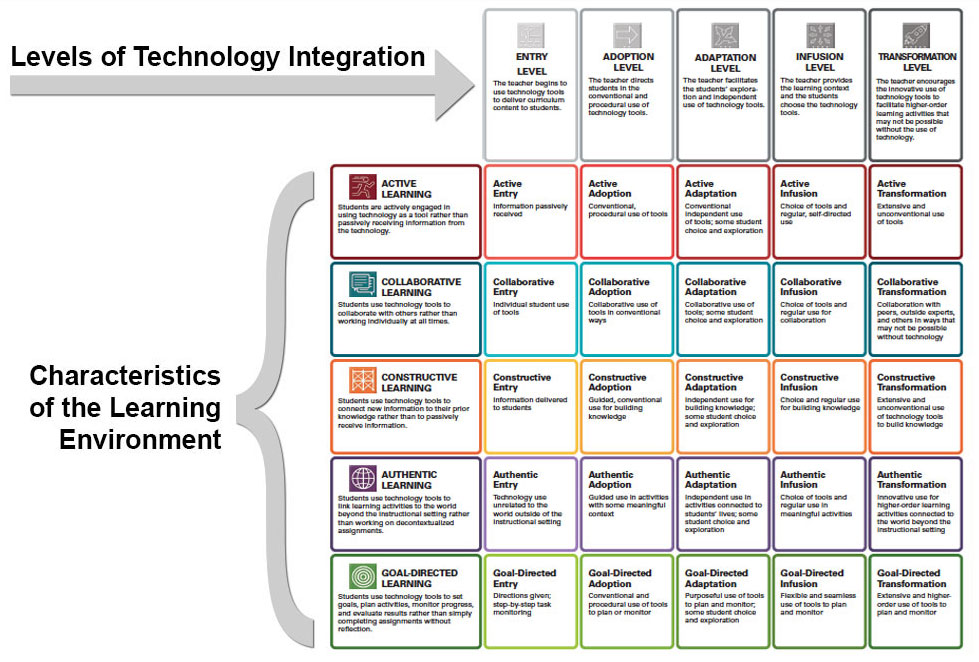
Graphic of the 5x5 matrix of the 5  learning environments and the 5 levels of integration

TIM or the Technology Integration Matrix helps with using technology to enhance learning.

There are five level of technology integration that the Promethean Board could be used for.

There are also five meaningful learning enviroments in which to use technology. In the classroom

teachers can and will use each level of the TIM.

1. Entry Level-the teache uses the technology to deliver instruction (Teacher instructs the student & shows images or videos)

2.  Adoption Level- the teacher decides how and when to use the tool. (The teacher teaches students how ton use the Promethean Board

3. Adaptaion Level- Students come to the board to solve a problem)

4. Infusion Level- different tools are integrated. (Students are able to use the app attached to the Promethean Board programs to create/answer questions. Students are able to send responses back to teacher once received on their devices.)

5. Transformational Level- students use tool to achieve specific learning outcomes. (Students are able to use the Promethean Board effectivly to present information to the class. 

 Teachers can go to this website to learn how to use the TIM Matrix for their classroom and to see examples. 

Graphic of the website the TIM to help teacher with planning lessons


References: 

Downstate Health Sciences University. (2023) Promethean smart boards. https://guides.downstate.edu/c.php?g=931899#:~:text=About%20Promethean%20Smart%20boards,%2C%20allowing%20teacher%2Fstudent%20collaboration.

University of South Florida. (n.d.). The technology integration matrix. TIM. Matrix | TIM (usf.edu)

Saturday, September 9, 2023

Fake News, Technology, and Literacy Oh My

 Reflect on how the concepts of information literacy, technology, and digital/media intersect. How did this week's readings, resources, and podcast inform your understanding of these concepts? Specifically address your own information diet and what you believe the information diet of a school librarian should look like.


The P21st Century Learning Framework  shows the importance of integrating all key concepts to help our students. It allows for teachers and students to know what’s important to learn about in today’s world. They must be critical, creative thinkers and know how to use technology. Students' use of technology is far different than it was 10 years ago and it will only continue to evolve.  To be able to use technology, we must insist our students are prepared to use it and can evolve with it.

Saturday, September 2, 2023

AASL vs ISTE standards

Using the perspective and context of a KQ article I explored, compare/contrast the AASL and ISTE standards. What differences do you see? What similarities? How do you envision these standards working together?


So here's the thing...after my years in education, I have learned that to get everyone within a school to do their part, teachers must buy into what we're selling. After reading Deborah Ehler-Hansen and Casey O'Meara's (2019), Portrait of a Graduate and the National School Library Standards I was about 89% sold into believeing the standards are the thing that will help our students. I appreciated how they not only showed how the standards were broken into I Can statements, but they were also put into a rubric to help show students proficiency level. But, I'd like to see some data. Where are the numbers that shows us that these standards are great, purposeful, useful, and that thing that will make our gradutes ready for this world with the abilities to think, create, share, and always grow?

Well, here you go... It may not be numbers, but this video is evidence directly from students. Watch as students as young as 3rd graders explain how some of these standards are beneficial and helping them become better thinkers and problem solvers.


AASL video showcasing students explaing the inquire 
standard in which they try to find answers to questions


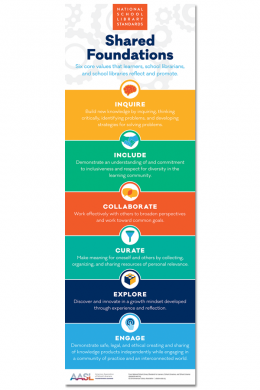
Photo of the Shared Foundations 
of the AASL Standards integration
The Shared Foundations are beneficial in helping to see some of the differences in the standards. But the most beneficial resource I found in helping me see the alignment between ideas is the AASL created National School Library Standards Crosswalks with ISTE Standards for Students and Educators. It uses the shared foundation to and creates domains for each standard. Then each standard within a domain is placed side by side to see connections. The thing that stood out most to me in terms of differences betweent the American Association of School Libraries (AASL) standards and the International Society for Technology Education (ISTE) standards is the verbiage and word choice. Due to the word choice sometimes competencies or alignments for the learner, school librarian, or school library weren't covered by the ISTE standards though they were covered by the AASL standards.


The ISTE standards seem to be geared more toward technological advancement while the AASL standards only specifically mentions the technolgy standard in the Engage domain. However, that is not to say that the AASL doesn't see the importance of technology, though not explictly mentioned it is implied. Again, that is just the word choice of the standards. It also makes sense that ISTE has technology weaved through its standards when you considering the word technology is in its name. Nonetheless, Both set of standards work together to increase students critical thinking, digital literacy, problem, solving skills, and ability to access resources. Each need to be taught and/or utilized to create powerful, engaging lessons for students.


STANDARDS ALIGNMENT

The AASL and ISTE standards are necessities in a school library. The standards provide the teacher librarians with a framework of what to teach and ensures the students are recieving all the information. Upon reviewing both standards I can appreciate the similarites, but question some of the differences. However simialr or different the Shared Foundations are used regardless of the standard because they are the core values promoted and reflected by learners, school librarians, and the school libraries (AASL, 2020).

References


American Association of School Libraries (2017). Learners interprets the standards: Inquire. YouTube. https://www.youtube.com/watch?v=QlGLPyAFqVc&t=12s


American Association of School Libraries (2018). National school library standards crosswalks. AASL. https://standards.aasl.org/wp-content/uploads/2018/08/180828-aasl-standards-crosswalk-iste.pdf


American Association of School Libraries (2020). Purpose & structure. American Library Association. https://aasl.ala.org/standards/overview/

Ehler-Hansen, D. & O’Meara, C. (2019) Portraits of a graduate and the national school library standards. Knowledge Quest 47(5), 23-29